
AI case analysis and medical chronology software for UK litigation One system that reads the file, builds the case and keeps it moving.
Plexo Legal is AI case analysis software for UK claimant law firms and medical review teams, built by Plexo Logic. It does the reading, ordering, citing and first assessment of every case file, and your team approves everything it produces.
- 1UploadDrag in the bundle or a Proclaim export
- 2ReadEvery page, with OCR for scans and handwriting; unclear pages set aside for a person
- 3OrderMedical records sorted by date and separated from correspondence
- 4ChronologyEvery entry cited to its source page
- 5AssessProspects, value and the case against
- 6ApproveA fee earner checks and signs off
- 7ExportWord chronology, records bundle, triage report, letters
What Plexo Legal does, feature by feature.
Reading the bundle
Every page of every document, whatever state it arrives in.
Reads any bundle
- Scanned, handwritten and digital documents in one bundle, including emails, Word files and case management exports. Scanned and handwritten pages are read with optical character recognition (OCR); born-digital files skip that step.
Never guesses
- Any page it cannot read with confidence is set aside for a person to check, rather than guessed.
Side-by-side review
- Every page beside its extracted text: approve, correct or mark unreadable, with each correction logged by user and time and the original reading kept.
Records sorted
- Documents are classified, medical records are separated from correspondence and the records are put in date order.
The cited chronology
A chronology your team can trust, because every line shows where it came from.
Every entry cited
- A dated chronology with every entry cited to its source page and the quoted passage highlighted.
Conflicts and gaps flagged
- Date conflicts, contradictions and gaps in the records are flagged as it reads.
Ready to send
- Export the chronology to Word, the full bundle as a zip grouped by type, or the medical records on their own.
Assessing the case
A reasoned view of every claim, argued from both sides.
Case Triage
- A prospects band, a recommendation to proceed, investigate or decline, and a valuation range from the firm’s own quantum brackets.
The basis, cited
- The reasoning behind every assessment is set out, with each point cited to the record.
The case against
- An adversarial review: what holds, where the claim is vulnerable, what evidence is missing and how the defence is likely to run.
Judgments to read
- Relevant published judgments linked for reading.
Triage report
- The triage outcome as a filed PDF report.
Caseload by chance of success
- The firm’s whole caseload ordered by chance of success, so dead files sink.
See the scan and what was read from it, side by side.
Open any page beside the text extracted from it. Approve it, correct it or mark it unreadable. The original reading is never deleted, and every correction is saved with who made it and when.
- Pages it could not read with confidence are set aside for a person, never guessed
- Every chronology entry links back to the page it came from
- A full audit trail of every review decision, ready if anyone asks
Practice-area tools
Grounded in the law that decides each type of case.
Consent and Candour Audit
- The record tested against the Montgomery consent standard and the statutory duty of candour, every finding cited. Clinical negligence.
NHS settlement benchmarks
- Each case placed against NHS Resolution’s published settlements by value band and clinical specialty, for each case and across the firm, kept separate from valuation. Clinical negligence.
Retainer and Scope Timeline
- What the professional was instructed to do, advised, warned of and how the retainer ended, with scope checks run against it. Professional negligence.
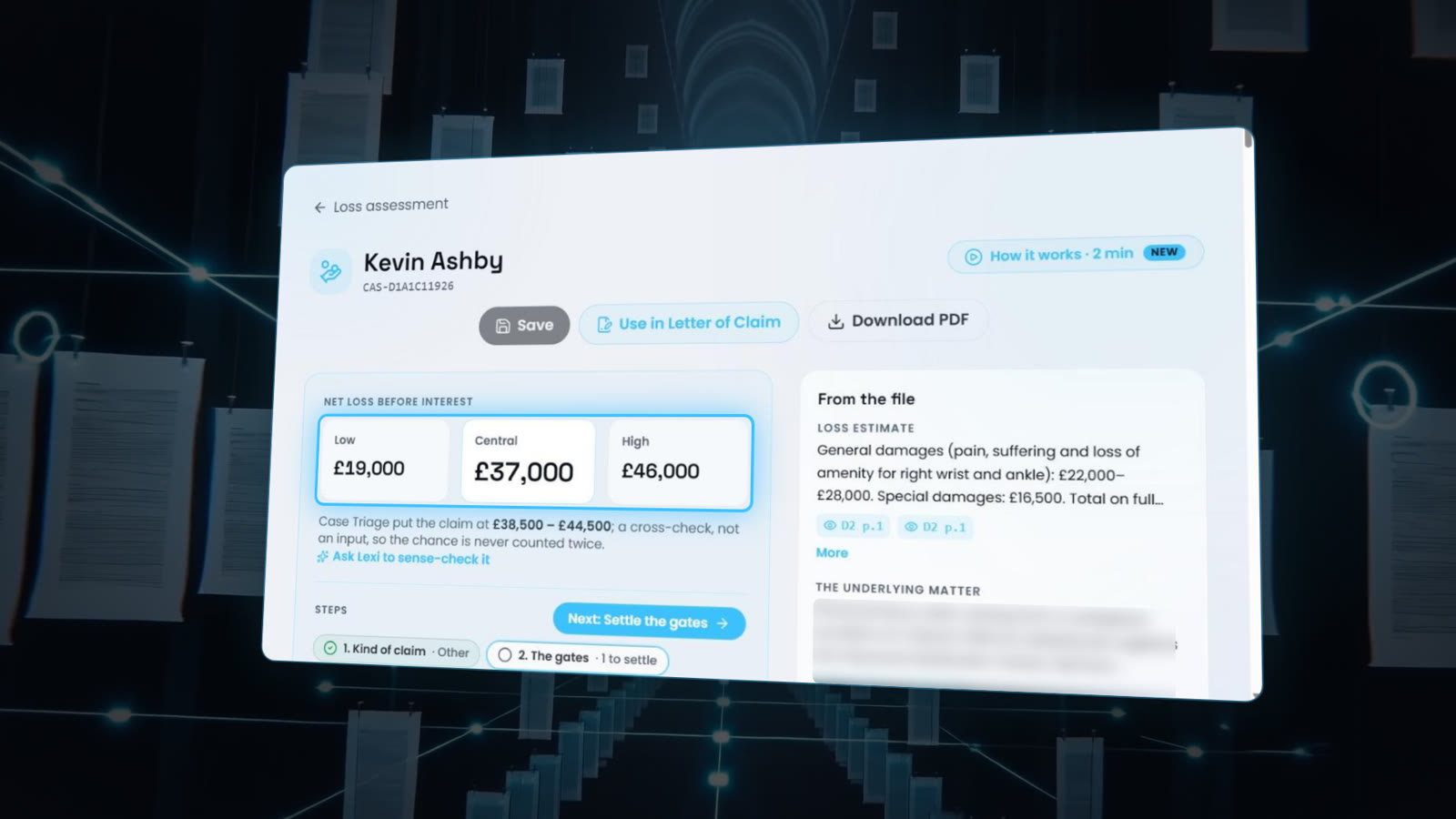
Loss Assessment
- The schedule of loss built step by step to a range, every step shown. Professional negligence.
Reference packs
- Asbestos, noise-induced hearing loss, clinical negligence and professional negligence packs that ground the analysis in the law.
Deadlines, costs and parties
The things that quietly go wrong on a busy caseload, watched for you.
Key Dates and Limitation
- The limitation clock, date of knowledge reasoning and a case diary with warnings before anything expires.
Track and Costs
- The likely court track, recoverable costs from the statutory tables and work in progress compared, with a red, amber, green view.
Morning briefing
- A personal email every working morning: limitation dates inside 90 days, overdue protocol responses, overdue costs reviews and what changed overnight.
Party and Insurer Intelligence
- Defendants checked against the live Companies House register, and their insurers traced.
Overnight processing
- Large bundles can be queued at the end of the day, with the full assessment waiting in the morning.
Drafting, Lexi and governance
The work gets done, and your team stays in charge of it.
Drafting and Letters
- Letters drafted from the cited record in the firm’s own templates, approved before sending, with chasers tracked.
Lexi
- An agent that answers questions about the file by voice or text with citations, navigates the app and highlights what she is describing.
Human approval
- Every output stays a draft until a fee earner approves it.
Access and separation
- Multi-factor authentication on every account, role-based access and firm data separation enforced in the database.
Audit trail
- Every AI action logged in a full audit trail.
Not a chatbot. The brain of every case.
Lexi has read the whole file. She answers by voice or text with citations, spots what is missing before the other side does, and takes you to the exact place on screen.
Every answer pinned to the page it came from.
Reads only the cases you are allowed to see, inside your firm’s walled-off data.
Cites every point. If the file does not say it, neither does she.
Navigates to the right case and tool and highlights what she means, so new staff barely need training.
Proposes, never decides. Anything she suggests waits for a fee earner.
Pt seen 00:42. Fall onto outstretched R hand. Tender distal radius. X-ray R wrist reviewed: no obvious fracture seen.
Plan: discharge with soft-tissue advice. Fracture clinic review in 7 days if pain persists.
Safety-netting advice given. GP letter sent.
No. The discharge plan says fracture clinic review in 7 days if pain persists, but there is no referral, attendance or missed-appointment entry anywhere in the bundle. I have flagged it as a record gap.
Breach looks strong: the addendum report says the fracture was visible on the first film, and the Trust admits it. Causation is narrower: the loss is the avoidable operation and its after-effects, not the fracture itself.
Opening Key Dates and Limitation now. The primary limitation date is highlighted, with the date-of-knowledge reasoning underneath it.
“Where does Plexo Legal fit alongside Proclaim?”
Proclaim, or whichever case management system you use, stays your system of record. Plexo Legal is where the file gets read and analysed. For now, documents move across by export and upload, and the results go back onto the file like any other document. However, we are working on making that hand-over smoother, so less of it needs doing by hand.
Export the matter’s documents
Download the bundle from the matter as you would for counsel, then drag it into a new Plexo Legal case. Proclaim’s own exports can go in too, and the Proclaim matter reference is kept on the case so the two stay matched.
The reading and analysis
Records put in order, the cited chronology, triage, the case against, limitation, costs and draft letters. Your team reviews and approves it here, with Lexi on hand for questions.
Save the results to the matter
Download the Word chronology, the triage report, the ordered medical records bundle or an approved letter, and save it to the matter like any other document. Proclaim keeps the official record.
Matters, tasks, time recording, billing, correspondence, workflows and your official file. Nothing about it changes.
The work Proclaim was never built to do: reading every page, ordering the records, assessing the case and drafting from the evidence.
Plexo Legal is independent and is not affiliated with or endorsed by the makers of Proclaim.
Straight answers.
If yours is not here, ask us in the demo. We will show you on a real bundle.
What is Plexo Legal?
Plexo Legal is AI case analysis software for UK claimant law firms, in-house medical review teams and medico-legal agencies. It reads and analyses every page of a case bundle, puts the medical records in order, builds a chronology with every entry cited to its source page, assesses prospects and value, argues the case against the claim and flags what is missing. A fee earner approves every output.
Who makes Plexo Legal?
Plexo Legal is built by Plexo Logic Ltd, a UK legal AI company founded by Diego Herrera.
How is Plexo Legal different from a case management system like Proclaim?
Proclaim, or whichever case management system you use, stays your system of record. Plexo Legal is where the file gets read and analysed. For now, documents move across by export and upload, and the results go back onto the file like any other document. However, we are working on making that hand-over smoother, so less of it needs doing by hand.
Which practice areas does it cover?
Clinical negligence, industrial disease (asbestos-related disease and noise-induced hearing loss) and professional negligence, with more practice areas in build. The shared tools, such as the cited chronology, Case Triage and limitation tracking, work across all of them.
How long does it take to process a bundle?
In November 2026, a 253-page, 43-document bundle went from upload to ordered records, a cited chronology and an assessment in about 11 minutes, and a 750-page bundle became an 856-entry cited chronology in 55 minutes. Word documents and emails skip the scanning step and process faster. Large bundles can also be queued to run overnight.
How does it stop AI mistakes reaching the file?
Every chronology entry and finding cites its source page, and each quote is checked against that page. Anything that cannot be verified is flagged rather than stated. Pages it cannot read with confidence are set aside for a person, who sees the scan beside the extracted text, and every correction is logged with who made it and when. Nothing is final until a fee earner approves it.
What do we get out of it?
A Word chronology with every citation, an ordered medical records bundle, the full bundle grouped by document type, a triage outcome report as a PDF, and letters drafted from the evidence and approved before they are sent.
Who is Lexi?
Lexi is the agent inside Plexo Legal. She answers questions about a case file by voice or text with citations, navigates the app and highlights what she is describing. She proposes; she never decides.


See Plexo Legal work through a real bundle, live.
Thirty minutes. A case is created and run while you watch, then we tour the result with Lexi.